
Adulting is HARD!
As an adult navigating my full plate of responsibilities and stressful adulting activities, the days seem to be getting longer with the years. I’m constantly on the go, bouncing from work to getting my family where they need to go in our single car household. Sometimes, dinner is fresh right from the stove to the Tupperware container for eating in the car. After that brief moment, it’s onto the next thing on the list. I love what I do, but it is a lot!
Self Care When Life Has Other Plans
So, I have to make sure to squeeze smaller moments of self care in where I can. That means I literally do a 10 minute meditation in the car or find the best way to prop up my phone on the steering wheel to watch a YouTube video. My wife even bought me a headlamp so if I have a chance to journal or cross-stitch in the car, I can without using my phone to see! The downside was I didn’t have a way to play my Steam library on the go.
Video games have become a necessity throughout my life as a way to unwind and connect. That relationship has only gotten stronger as an adult. When out and about, I make sure to have a variety of mobile games on my phone to fill the time but that’s all they are, ways to fill time. I don’t quite get the same release from mobile games as I would on my desktop at home. In my experience, mobile games don’t shut you off from the world. While having a blast with HayDay, I’m still getting notifications from emails, Twitch, and spam messages. I’m not truly disconnected like I am PC gaming where the desk matt literally absorbs my phone’s vibrations. Of course, I don’t want to ignore people who need me, but I need time for myself too, as any person does.
So how can I incorporate more gaming time and truly get the refreshing disconnection I need?
My curiosity peaked when seeing advertisements on a newer device, the Steam Deck. I sat on the thought of getting the Deck for a long time. First off, it’s not cheap. The base model, the Steam Deck LCD, is $399 USD (as of writing in April 2025), only going up from there. These devices don’t see large sales often either. Also, I worried about if I would reach for it during desired gaming times. My wife has a Nintendo Switch that she will let me play on as well. I would have fun playing it but it was not a device I used regularly. Maybe, that was because it was mostly hers, not wanting to intrude. Whatever the reasons, the Nintendo Switch never ended up in my nightly go bag. Yet, here I am looking at this mobile console. Why purchase a device like this if I have something similar that I don’t use even though it is readily available? So I sat on it, until it was my birthday.

The Steam Deck Takes the Stage
My wife ended up buying me a Steam Deck for my birthday. She had seen the stress I was in and the curiosity I showed in the device. Being sly, she asked occasion questions about which model I interested me and what I liked about it. Of course, I was doing my homework and doing comparisons on this spec versus that. Unknowingly, I gave her all the information she needed to make the leap for me. I can’t thank her enough. Now that I have the Deck, it’s been a game changer! I can play my PC games on the go, actually disconnecting from the world for a little while and enjoy the games I would at home. I have even taken to using it for more indie games that I typically wouldn’t reach for on my desktop.
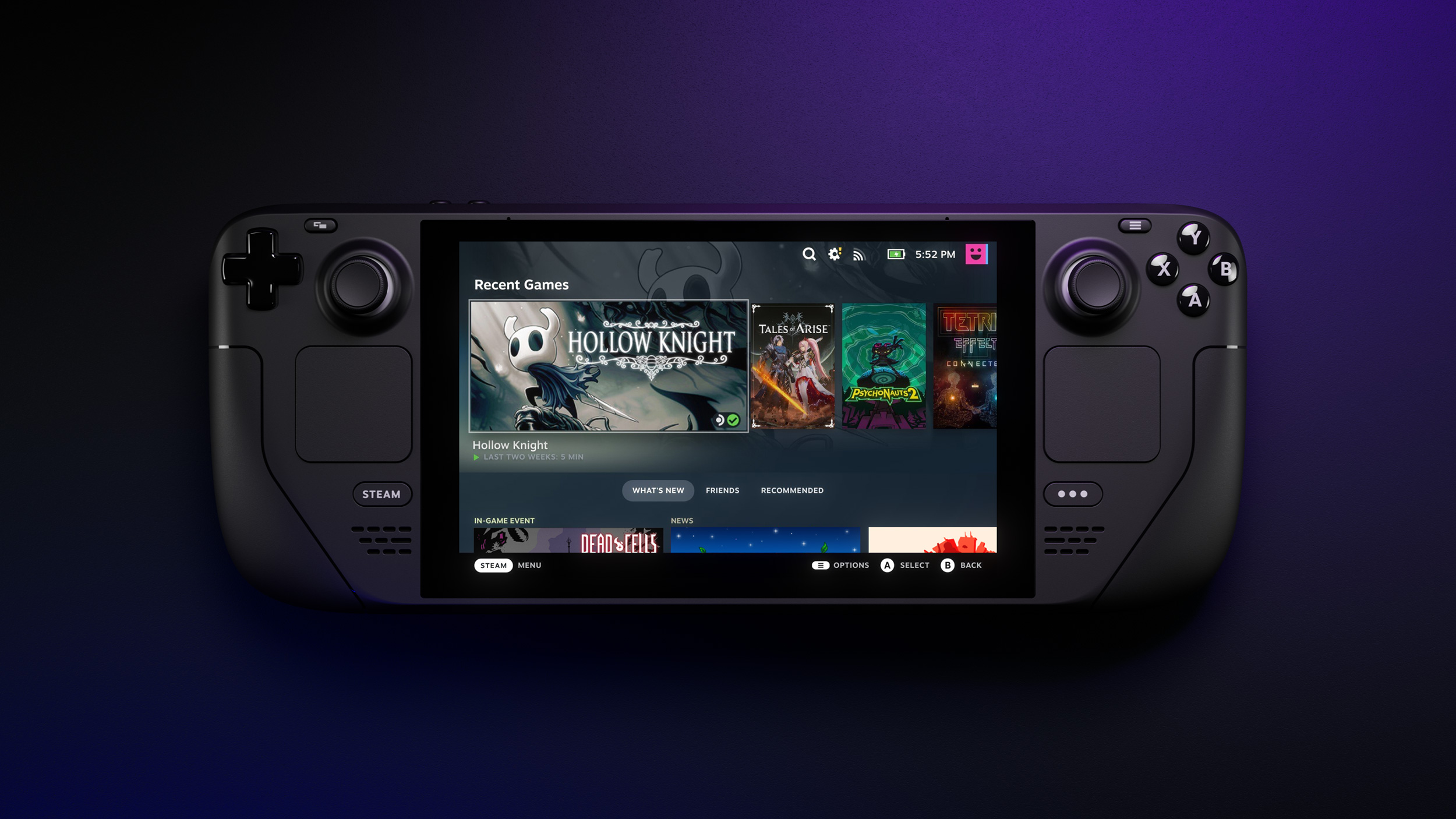
Let’s go through what the Steam Deck has to offer gamers. According to Steam, the Steam Deck is a portable handheld console, designed for you to take your Steam library on the go. In addition to its powerful components, it hosts a large display screen (7 inches on the base model), all conveniently packaged in a sturdy carrying case with a charger. As long as the game desired is downloaded to the device, it’s playable online or offline. Steamdeck.com provides more details on the technical specifications if interested! I’m going to focus on my experience as an everyday player to show what was important to me when trying out this device.

Powerful Little Beast
With ergonomics and power at the core of its design, this machine truly feels like a desktop on the go.1 Steam partnered with Advanced Micro Devices (AMD) to create the same powerful processing as a typical computer.1 Even though this is a mobile device, it can handle graphically dense AAA titles gamers were raving about, including Baldur’s Gate and God of War (2018).1 In my experience, this is an understatement.
I take good care of my PC but it has been a few years since I’ve done a large component upgrade. It hadn’t been holding me back until I tried to play The Witcher III: The Wild Hunt or Hogwart’s Legacy. Both games are graphically intense and require a bit more power to run. I had been holding off on my experiences for those games until I had more of a need to upgrade my CPU or graphic card (not cheap!). The Steam Deck has given me more time to budget and plan out those purchases. Both games are available and play great on the Steam Deck, even better than my gaming desktop! Without the Deck, I still would be waiting to begin my experience for those games. Now that I have, finishing is another story.

Battery Life
Historically, battery life has been the biggest concern when playing games on the go. As games get bigger and require more systems to run, this issue is going even for mobile phones. I thought this would be a problem for the Steam Deck as well. On average I get about 3-6 hours of gaming on my device, but that varies greatly depending on the demands of the game. Smaller games like Celeste or Stardew Valley don’t drain my battery as quickly as Hogwarts Legacy will. Given the amount of time that I am able to use it, however, this is perfect for me! While waiting for my wife to return from her appointments in the car, I can put an hour or more into gaming. When she’s ready, I just save (game dependent of course), pack it up, and back on the road I go.
For longer gaming sessions, I can adjust the display settings and technical aspects of the Deck to optimize the balance between the game and the battery life. Charging the device is very easy and quick with the provided USB-C charging cable. My only complaint here is the outlet plug is on the bulky side like previous Steam products have been. If your outlets are tight together, you will have to do some configuring to plug it in. I have used my wife’s Chromebook USB-C charger to charge it when space was tight and it worked great!

Physical Design
This is where I have heard the biggest complaints of the Steam Deck, and I don’t blame them. Don’t get me wrong, having a nice size screen for gaming is great. For a handheld device, however, this device can feel HUGE. I have small hands which makes it feel even larger. Some reviews have also claimed it is heavy. I can see how some people feel this way, however I quickly adjusted to the weight (roughly 1.5 lbs) and size of it as I practiced playing more. The buttons are comfortably laid out with two joysticks, your usual A, B, X, Y (in Xbox configuration), directional arrows, bumper buttons, and triggers on the grips. The screen is a touch screen making it super easy to navigate and even use the on-screen keyboard for searching (which is completely customizable through the Steam Store).
What About Accessibility?
The most fascinating feature of the design is the accessibility built in. There are two track pad spots on either side of the device for ease of navigation in mouse functions. They have also built in two additional trigger buttons on the sides of the grips. Every button on the Steam Deck is programmable in the settings so gamers can set the device up however they need. I currently don’t use the additional triggers and they don’t get in the way of my experience with the Deck, but I love that they are there to use if I want to, and more importantly, for those who do need them to make the device easier to use for their experiences. The design truly has the gamer in mind to maximize their on the go gaming experience.


Gamer Focused
Ever since its development, the Steam library has teams go through games and testing what games are compatible so the library of games from Steam is constantly growing. Steam will also provide compatibility information completely upfront. Every store page contains a space where the Steam Deck rating is displayed. Verified means the game is compatibility and optimal for Steam Deck play! Playable means the game can be played on the Steam Deck but may need additional input. This could be for a variety of reasons.
What I’ve Seen
In my experience so far, this is mostly because a keyboard or touch screen input is needed. For example, The Elder Scrolls V: Skyrim on PC has a launcher where the player can change settings, check out the creation club, and start the game. The Steam Deck still has this launcher and I have to use the touch screen to select the option for launching the game. This doesn’t affect anything to do with my playing experience while in the game.
On Steamdeck.com, players can see what games have been recently verified or playable versus what games they are working on (or ”Unknown”), or what games aren’t compatible (“Unsupported”).2 I fortunately haven’t run into too many games in my library that just won’t work, but that can be frustrating to get a game thinking you can play it just to find out you can’t. I really enjoy the work Steam is putting into ensuring that information is communicated, regardless of whether you have the Steam Deck.
Tip: If you aren’t sure if the Steam Deck would be worth the purchase, see how many of the games you love to play are compatible. This was a large factor in my desire to try it out and can really inform your purchase.

What I Considered When Deciding
If you’re like I was and on the fence about purchasing the Steam Deck, allow me to tell you I completely understand. Mine was purchased for me as a gift, but I do ultimately believe I would have gotten over the initial price eventually and purchased it myself. I fully acknowledge that is not an option for everyone looking at the Steam Deck. For me, it was a matter of self care. My mental health and stress levels were a problem. I wasn’t giving myself enough space to have time to myself while also taking care of everyone else. The Steam Deck has allowed me that option without being bound to my house and home internet.
I think it is also important to acknowledge that mobile gaming isn’t for every gamer out there. Even with the Deck, mobile gaming is still not my preferred way to experience my games. I will say that this is the most fun I’ve had gaming on the go since my childhood playing Donkey Kong Country on the Nintendo GameBoy Advance. I also use it more than my wife’s Nintendo Switch, though I will still use that for some quality Luigi’s Mansion 3 time.
The Bottom Line
The biggest advice I can give to the gamer on the fence is to know what you like in your games or environment. Use your current library or Wishlisted games to see if the games you play are “Verified”. If they aren’t, it’s definitely worth waiting to see if that changes and save your money. If they are, this can open a new world for you. The Steam Deck could be for gamers to start playing PC games when they can’t afford a gaming laptop or desktop. It’s up to the gamer to decide if it’s worth their time and money. For me, it was.
To find out more information about the Steam Deck LCD and its other models available for purchase, check out the Steam Deck’s host website here. To understand more about Steam’s verification process for games, read Steam’s explanation in more detail here.
Citation:
- Steam Deck. (n.d.). Steam Deck. https://www.steamdeck.com/en/deck
- Steam deck :: Deck verified. (n.d.). Steam Deck. https://www.steamdeck.com/en/verified
Enjoyed reading this? Check out my other posts here! Leave a comment below!
This post is not sponsored. All thoughts and opinions have been made independently through experience and time spent with the game.
